How to Maximize Your Use of SEMrush: Tools, Tips, Training, and More
When it comes to SEO tools, SEMrush is the pack leader, the absolute grand daddy of SEO tools. With powerful features, and insights, SEMrush can run the whole garment of a website, look deeper into your competitors, identify your top organic keywords, allow you to do in-depth backlink analysis, and more. I started using SEMRush a long time ago as a newbie SEO specialist, and really only kept to the tools that I understood, SEO Audit, Domain Overview, Position Tracking, and was very meekly moving along the suite. It can be overwhelming, you constantly think "Wow if only I knew how to use all these tools!!"
So now I've broken down all the tools and tricks I wish I knew about before starting to use SEMRush.
Keyword Magic Tool
If your business is in an industry with some beefy competition, it will be difficult for you to dominate search results if your content strategy is aiming too high, to begin with. We'd sure love to rank for those big evergreen topics right away but websites with higher domain ranking authority will always outperform new kids on the block in search rankings.
Let's say you had your heart set on going after popular keywords, and find out what is sitting at the top are those big websites that have dominated for years. Don’t be discouraged, just revise your strategy!
Find sneaky long-tail keywords with high traffic potential to focus on instead.
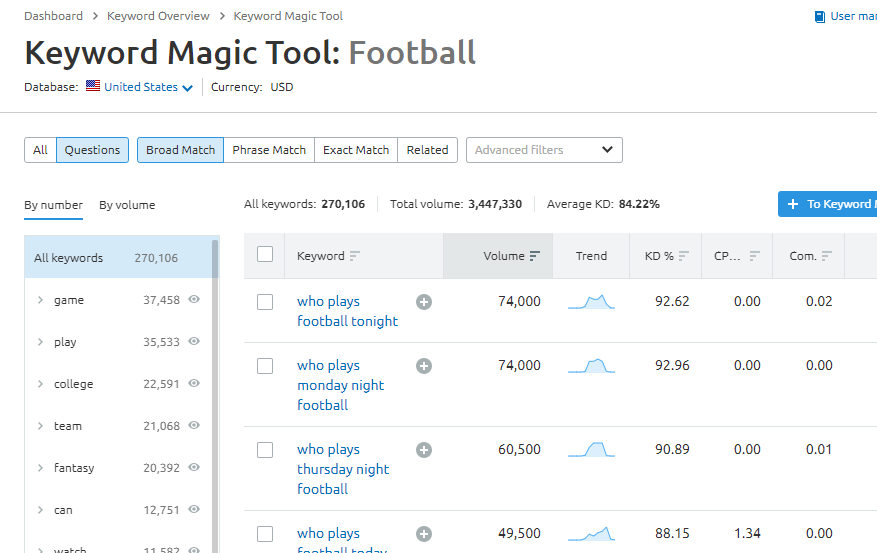
With SEMrush’s Keyword Magic Tool, you can generate a bunch of long-tail keywords for your seed keywords. Try it yourself by logging into your SEMrush dashboard and clicking on Keyword Analytics, then Keyword Magic Tool.
From there, enter your seed words and click Search. SEMrush will then generate a list of related keywords, then show you the key metrics related to them, such as keyword difficulty (KD), volume, CPC, and competition.
To find long-tail keywords, narrow the large list of keywords down to a select few, then find long-tail combinations keywords people use. These keywords will have a lower search volume, but far less competition-which means you can begin to outrank your competitors.
My super top tip is to hit the questions tab for any keyword that will spring up all the question based keywords. Boom, you've just got your first run of blog topics to begin with!
Find Out Who Dominates The SERPs
Every marketing campaign should contain an element of competitor analysis. You can’t outrank your competition in Search Engine Results Pages (SERP) unless you know who you’re competing against.
SEMrush helps you effortlessly identify your competitors by navigating to their Domain Analytics feature and then clicking Organic Research. Here, you’ll enter your domain URL.
To view your competitors, click on the Competitors tab. You’ll see a list of all domains your website is competing against in the top search results.
I find this visual layout is super useful for showing potential or just on-boarded clients to get them to understand what their up against:

SEMrush ranks domains by competition level-this is based on the analysis of the number of keywords two websites share in common. If interested, you can export the list of competitors by clicking on the Export button at the top right of the list.
May Update:

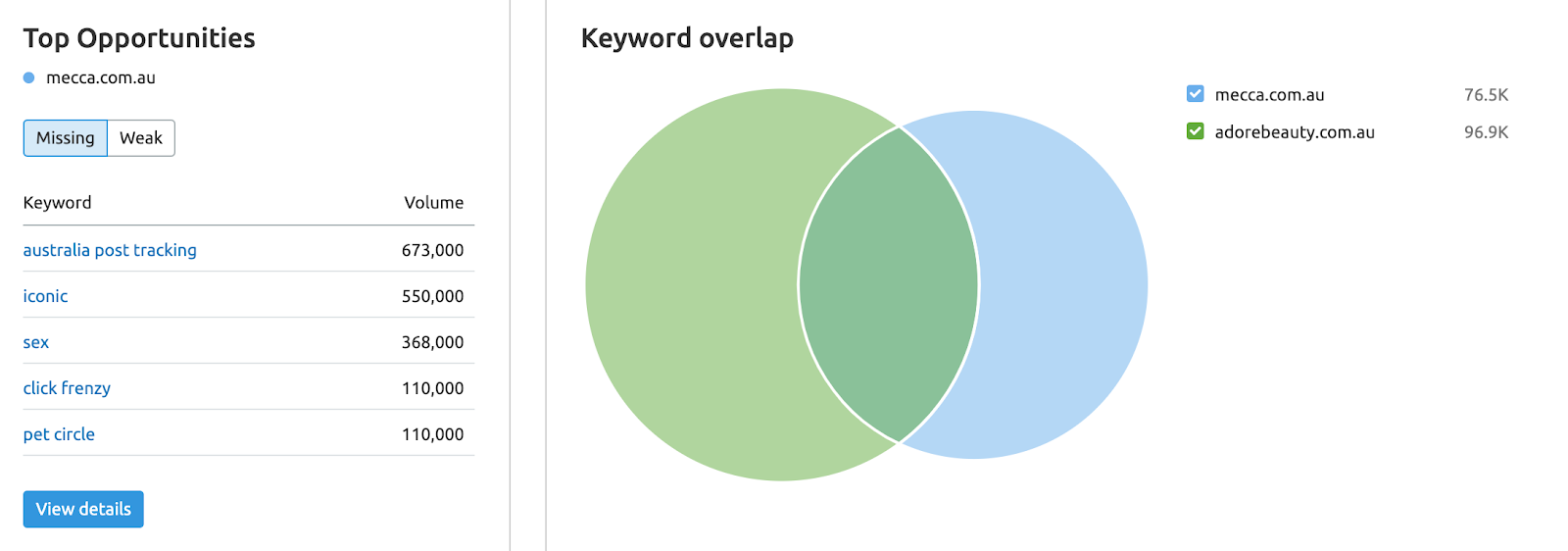
SEMrush have now in their Domain Overview tab a quick view which shows all the metrics we know and love, and the keyword overlap in between.
Spy on Your Competitors’ Top Performing Pages
With more competitor insights, you can fine-tune your marketing strategy. Now that you know who your competitors are, find out how they’re performing so well. SEMrush also let’s identify your main competitor’s top-performing pages (those that generate the highest search traffic). To do this, select Domain Overview within the drop-down menu and enter the domain you’d like to track. Once you ave the results, click Organic Research and then Pages. Here you’ll see a list of the company’s top-performing pages and how much organic traffic each page generates.
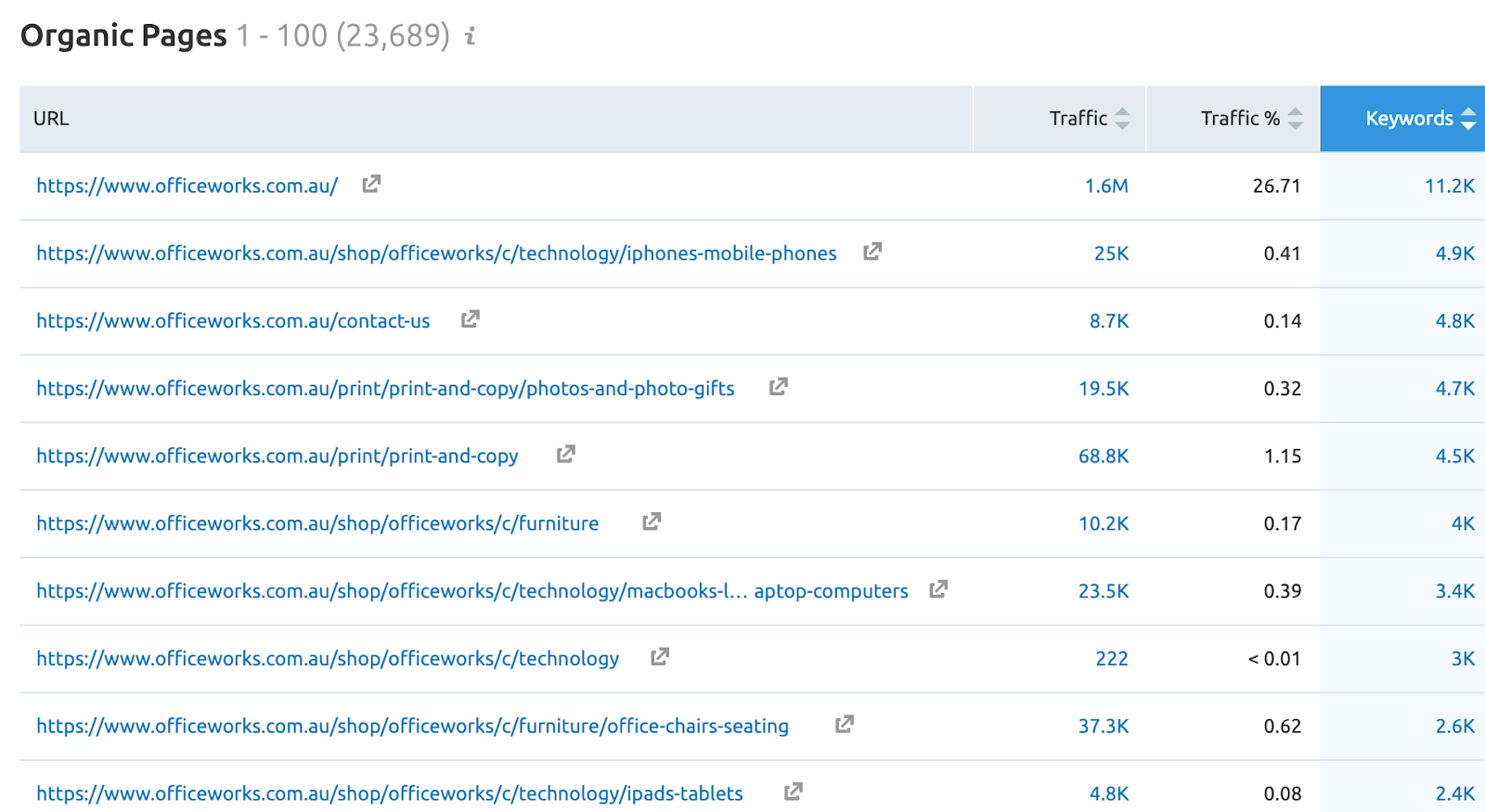
If there is a page you’d like to target, click on the keyword number to show the total number of keywords that page ranks for-only those within the top 100 Google results will show.
For the longest time I wished to be able to get that sneaky visibility into competitors, finding this really opened up perspective on:
- Blog articles that were performing well
- How their subfolders and overall information architecture was set out for mapping out site structure
- Useful to redirection campaigns in understand what pages are organically a priority.
This way, you’ll also gain backlinks that may have gone to your competitor, which will also help your search engine ranking.
Find Your Backlinks and Reclaim Them
Obtaining backlinks is hard work. You have to create compelling content, share it with industry influencers, and hope they find it valuable enough to link to it through their website. With SEMRush, you don’t have to live in fear of losing your backlinks. You can reclaim them by going to Domain Analytics, then clicking on Backlinks and entering your name.
Once you get to the results page, click on the Backlinks tab to get a broader view of your link profile. Then, select Lost backlinks within your profile and filter them by Follow. Sort the links by Trust Score in descending order. Doing this ensures you’re tracking down lost backlinks that came from high-quality domains.
From here, you have to reach out to the owners of each domain and ask them to put up your content again or present them with new content to add value to their website.
Site Audit Fixes and Progression
Critical SEO errors can seriously affect your website’s search engine rankings.
With SEMrush, the primary tool that gets a lot of action is called Site Audit that will identify technical SEO issues and highlight the steps to take to fix the errors quickly. To perform a site audit, navigate to Projects from your SEMrush dashboard. Then click Add New Project and enter your domain.
Site Audit will then “crawl” your website and generate a report on all the errors you need to fix to achieve a higher health score
Running a site audit every week to fix any issues as they occur and strive to maintain a health score of 85% and above.
As part of is it the compare crawls section that will give you the fixes and issues compared across crawls done at different times:


As really great way to visually lay out for clients how they've performed through fixing these issues and some may not understand what the full scope of how bad their website might be running:
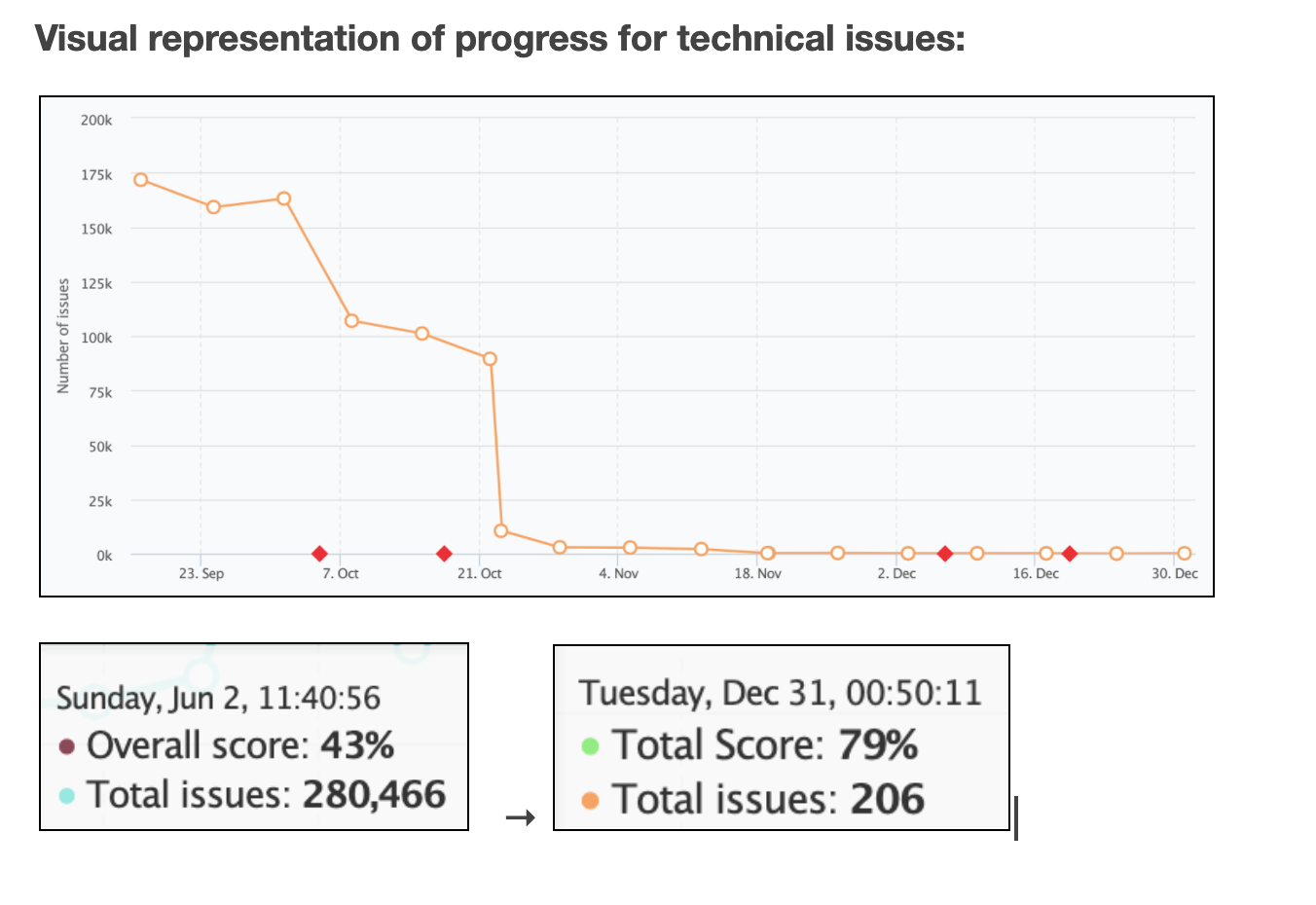
Snippet from an actual SEO Report for one of our enterprise clients!
Managing to clear off over 280,000 issues flagged was a huge achievement on a 10,000+ page website, best to let it not go unnoticed.
Bulk Backlink Analysis
A fantastic way to quickly batch out analysis of domains and even URLs of the same website. Underneath Gap Analysis you'll see the Bulk Analysis tool:

I often use this to vet out websites that I've been told are super strong DA or assess the weight of what a competitor is bringing to the table.
Brand Monitoring
Clients are often asking, how can I gain more backlinks on website Brand Monitoring will track any mention of a name, brand, keyword or phase you want to get visiblity on.

Business are always keeping on top of their press, positive or negative, this a great way to see who's talking about you, who's linking to you, and keeping a tabs on your online reputation.
You'll receive weekly notifications on new mentions online to keep your finger on the pulse.
Content Analyzer
Without a doubt my favourite tool using SEMRush right now, discovering and understanding how to use this this really opening up what I could do as part of the SEO strategy. A website will often have already a massive blog section that's been pumping out content to now end, and perhaps with no SEO backing behind the topics they've written about.
I've started off with website with already over 1000+ blogs to filter through. Making it quite difficult and laborious to recommend content they've already covered off 2-3 years ago.
The Content Analyzer can tell you how your content is performing organically by measuring it against social shares, backlinks, keyword rankings. Critically when setting it up it will hook into Google Analytics and Google Search Console to feed back page sessions and bounce rates.
Once you set up your project inside, you'll be fed out a 4 sets of data to look at, content to rewrite or remove, needing updating, quickly review, and poor content. These are all based on filters such as the content being older than 2 years and not having more than 15 pages views in that time.

You can customise this all to what you want to see as most important, also depending on how many on average page views you get you'll want to set this up logically to feed you the right information.
With this in your arsenal you can prime up your content strategy to first assess what you already have to deal with, to optimise, instead of adding more content and more pages.
Keeping the crawl budget consolidated toward the top performing content that produces results.
Re-Structure Your Content
SEO isn’t always about starting from scratch. It’s vital to optimise your existing content to keep your entire site SEO-friendly.
One less-popular, but highly helpful tool within SEMrush is the Content Template. By providing a template of recommendations based on your seed keywords, this tool helps you craft content that is SEO-friendly. These insights come from Google’s top-ranking pages for your target keywords.
Take Google’s suggestions to heart and structure your content; however, you need to outrank your rivals in Google SERPs. You will perform better in SERPs if you use semantically related keywords to add more context to your topic.
You’ll also receive a suggested list of backlink targets, your readability score, and suggested text-length for your content.
Don’t ignore the opportunities in optimising what’s there to put your energy into creating content that’s not ranking yet.
More tools to come!
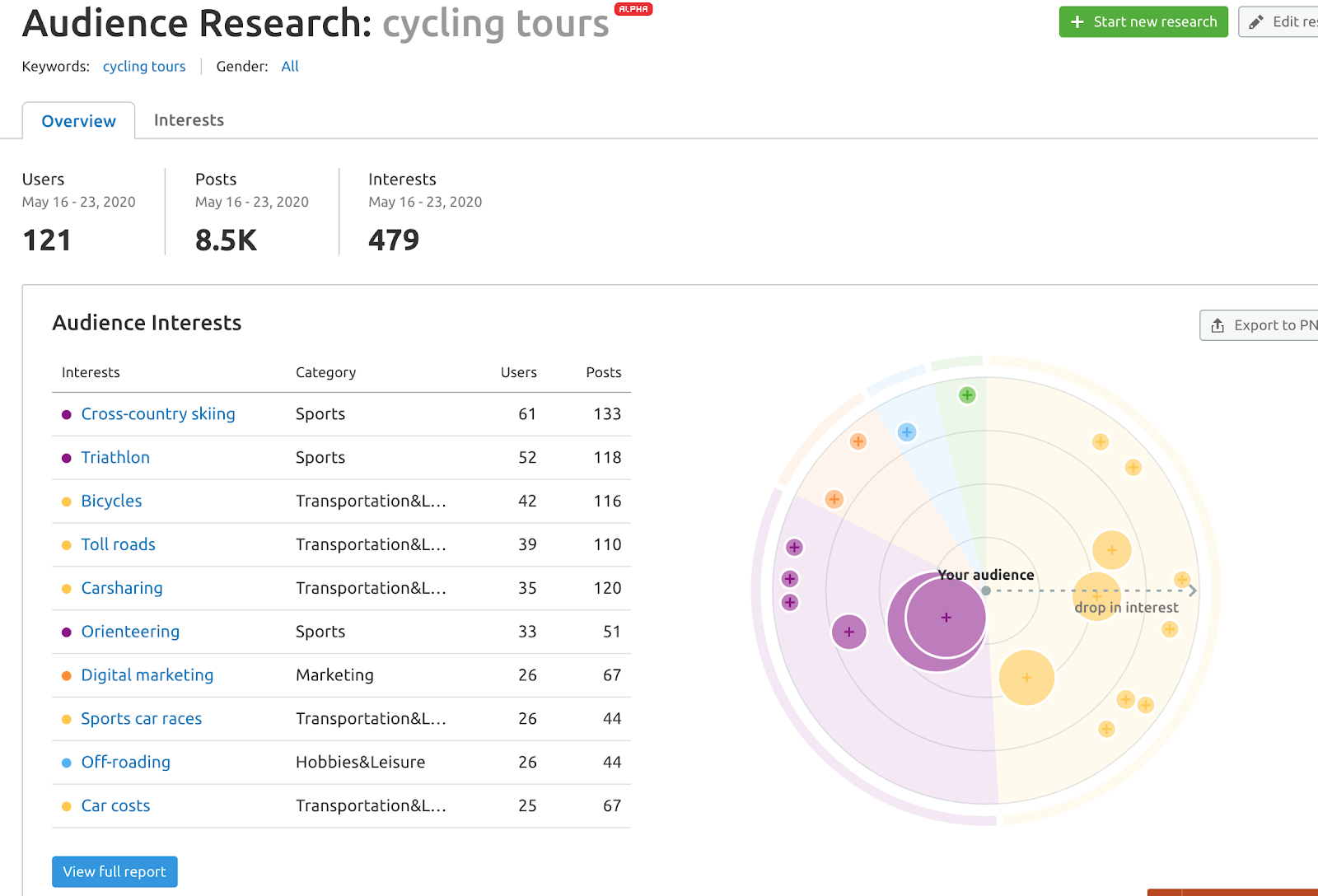
SEMRush are continually releasing new added tools, such as last week the new Audience Research tool:

We’re Here to Help You Drive Organic Growth
Now that you know the ins and outs, and some of the lesser-known features, of your SEMrush subscription, it’s time to start optimising your website.
If you get stuck, we’re here to help. We specialise in all things SEO, including keyword research, website auditing, content suggestions, and more. Contact me via email or fill out the contact form at StudioHawk, get in touch for an SEO audit of your website.
Sources & Further Reading
Enjoying this? The 60-second versions live on Instagram.
Follow @lawrenceaiseo →Watch: Semrush Tutorial For Beginners | The Ultimate Guide
Soaring Above Search
Weekly AI search insights from the front line. One newsletter. Six sections. Everything that actually moved this week, with a practitioner's take.

AI SEO consultant and AI search consultant helping brands appear in AI Overviews, AI Mode and ChatGPT. Chief of Staff at StudioHawk, Australia's largest dedicated SEO agency. Runs a measured three-channel playbook: Google, Bing and AI citations. Book a free consultation →